2026.07.03
Cloud Save and a Library (Beta): Your Annotations, No Longer Lost
You spend ten minutes numbering a screenshot and drawing arrows on it — and closing the tab throws it all away. Now one Google sign-in keeps your work in the cloud, ready to reopen and keep editing.
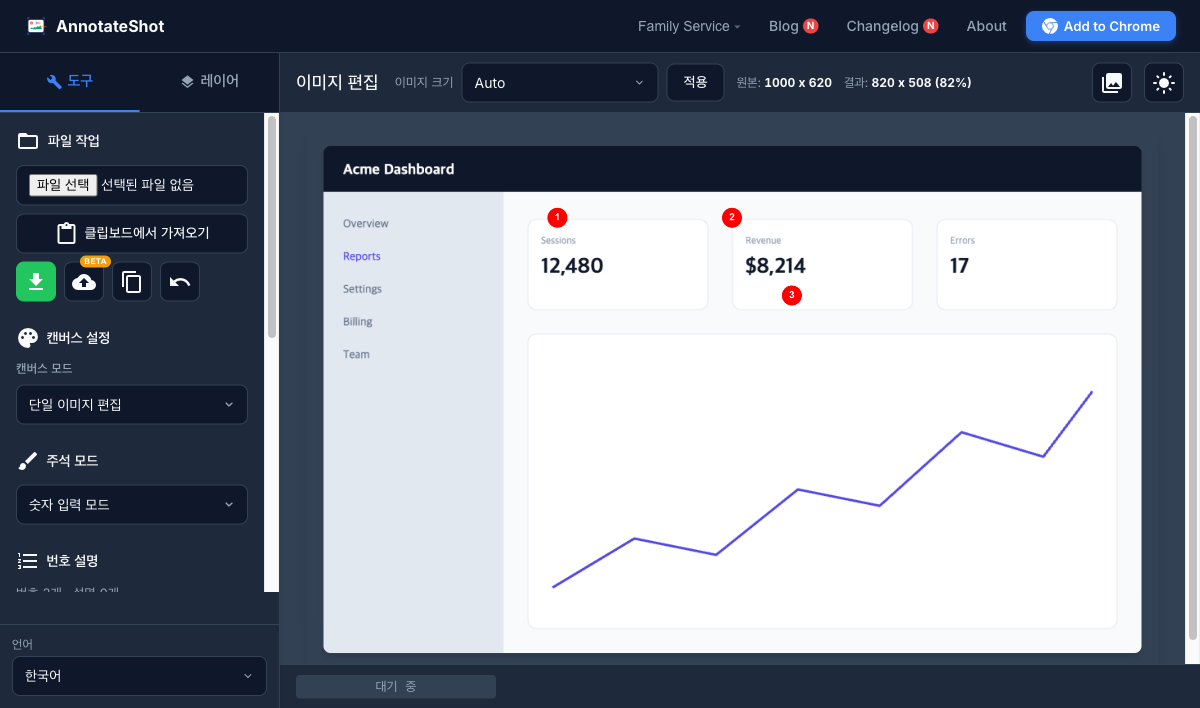
AnnotateShot has always been a serverless tool. Your images never leave the browser, which is great for privacy but has one real cost: nothing persists. Put twelve numbered markers on a manual screenshot, export the PNG, spot a typo the next day — and you are starting over from a blank canvas.
The new Cloud Save (Beta) in v4.5.0 fixes that. There is a cloud icon in the editor now; click it, sign in with your Google account, and the current work is saved as a whole. No signup form, no password. The free tier keeps up to 10 images.
Reopen it, and the annotations are alive
The important part is what gets saved. It is not a flattened PNG — the tool stores the background image and the annotation data separately. Hit "Edit" in the library and every number, shape, and text box comes back as an individual object: drag a marker to a new spot, delete a rectangle, keep adding on top. Because the background is never re-encoded on subsequent saves, you can re-edit and re-save as many times as you like with zero generational quality loss.
Coordinates are also scaled proportionally if the canvas size differs between sessions, so a screenshot saved on a laptop opens with the markers in the right places on a desktop monitor.
The library: browse, copy, share
Saved work piles up as a thumbnail grid in your library. Each card offers four actions.
Edit is the re-editing flow above. Download gives you the composite with annotations baked in. Copy to clipboard puts that composite straight on your clipboard for pasting into Slack or a doc. And public link — my favorite — mints a short URL like annotateshot.com/s/…. Anyone with the link can view the image without signing in; anyone without it cannot find it. If you re-edit and re-save the image, the link serves the latest version.
Optional by principle
The rule we cared most about: nothing changes for existing users. If you never sign in, AnnotateShot behaves exactly as before — images stay in your browser, and no account data is collected. Only when you press the save button does that one image go to the cloud (Google Firebase), readable by your account alone. The privacy policy spells out what is collected and how to delete it.
The Beta label is honest labeling: storage policy, the share page, and a paid tier may still evolve. What will not change is the core promise — the annotation work you put real minutes into no longer dies with the tab.
Feedback is welcome. Open the editor and try the cloud icon.